Free usage is now available on puq.ai
Integrations Templates Blog Pricing

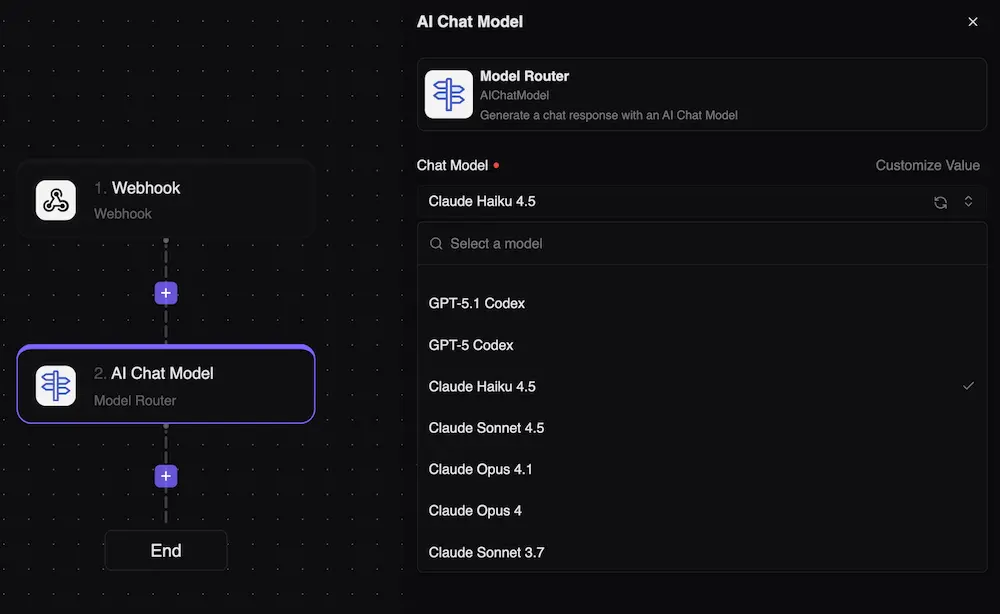
AI Model Router

Use the right model for every AI step

Route each AI task to the model that fits the work. Balance quality, latency, and cost without hard-coding one model for every workflow.

Core Capabilities

What this feature helps your team do

Routing

Match model to task

Use stronger models for reasoning and faster models for routine generation.

Performance

Tune speed and quality

Design AI workflows around the tradeoffs each step actually needs.

Cost

Control spend

Avoid sending every task to the most expensive model by default.

AI routing configuration

AI operations

Model choice should be part of workflow design

Different AI tasks have different needs. Routing lets teams apply the right level of intelligence where it matters most.

  • Task-aware routing
  • Cost-conscious model choices
  • Provider flexibility
  • Workflow-level AI governance

How It Works

A practical path from setup to production

1

Define the AI task

Identify whether the step needs reasoning, extraction, writing, classification, or summarization.

2

Choose routing rules

Set how the workflow selects a model for that task.

3

Run and measure

Watch outcomes, cost, and performance.

4

Tune over time

Adjust routing as model quality, pricing, and workload needs change.

Common Use Cases

Where teams use AI Model Router

Support reply drafting Document classification Lead scoring Content enrichment

AI Model Router questions

Clear answers about how this capability fits into real workflow automation.

A router helps match each AI step with the model that best fits quality, speed, and cost requirements.
Yes. A workflow can use different models for different AI tasks.
Yes. Routine tasks can use lower-cost models while complex tasks can use stronger models where needed.
Yes. You can update routing as your workflows and model preferences evolve.
Automate Every Job

Ready to automate?