

AI Workflow Variable Management

VARIABLES

Workflow Variable Management

Manage recurring data across your AI workflows from a single, centralized hub. Securely store, organize, and instantly integrate dynamic values into every step of your workflows.

Get Started Contact Sales

What Can You Do?

Store API keys, configuration settings, and dynamic values centrally. Access them instantly from any workflow step.

4 TYPES

Flexible Variable Types

Create variables in String, Number, Boolean, and JSON formats. Store anything from a simple text value to complex nested JSON structures.

SCOPE

Global & Workflow Scope

Define variables as global to make them available across all workflows, or create workflow-scoped variables for project-specific settings.

ENCRYPTED

Sensitive Value Encryption

Mark secrets like API keys, tokens, and passwords as sensitive. Values are stored encrypted and displayed as masked (***) in the interface.
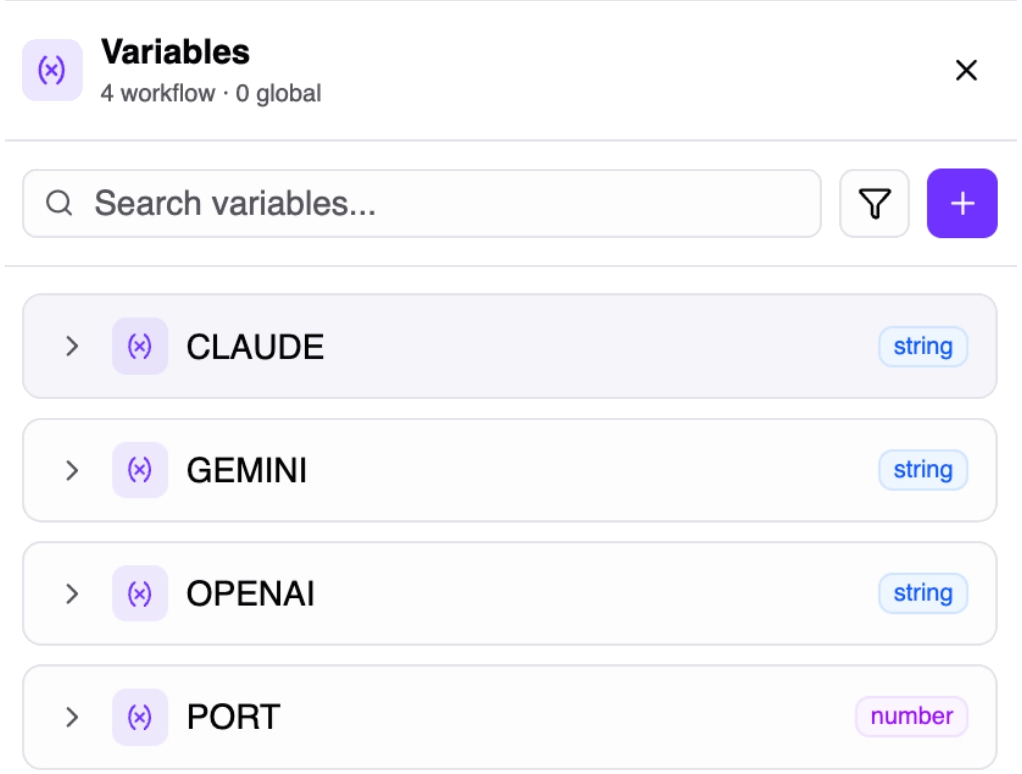
Variables

POWERFUL MANAGEMENT

Access, organize, and control your variables effortlessly.

  • Quick Access in Workflow Editor: Insert variables via the Data Selector panel without writing code
  • Nested JSON Access: Navigate sub-fields of JSON variables directly from the Data Selector
  • Active / Inactive Status: Toggle variables between active and inactive states for test and production
  • Search, Filter & Sort: Find variables by name, scope, type, status, sensitivity, or creation date
Try It Free

Use Cases

See how Variables can simplify and secure your workflow automation.

API Keys & Tokens

Store credentials for external services like OpenAI, Slack, or Google as sensitive variables and use them securely across all your workflows.

Environment Configs

Keep environment-specific URLs, port numbers, or feature flags in global variables for development, staging, and production setups.

Dynamic Parameters

Define workflow-specific thresholds, template texts, or JSON configuration objects as variables — change behavior without editing steps.

Feature Flags

Use Boolean variables to conditionally enable or disable specific workflow steps on the fly.

Variable Types at a Glance

Choose the right type for every data point in your workflows.

String

Text values, URLs, template texts, and any character-based data.

Number

Numeric values for thresholds, limits, port numbers, and calculations.

Boolean

True/false flags for feature toggles, conditional logic, and status checks.

JSON

Complex nested structures, configuration objects, and multi-field data.

Take Your Workflow Automation to the Next Level

Centralized data management across all workflows

Encrypted storage for sensitive credentials

Eliminate repetitive manual edits

Seamless integration with the visual workflow editor

Centralized Variables
Secure & Scalable Management

Questions & Answers

puq.ai is a powerful workflow automation platform that helps you connect apps and automate repetitive tasks without coding.
puq.ai uses a visual workflow builder where you can add actions to create automated workflows between your favorite apps and services.
puq.ai supports 500+ popular apps and services including Slack, Gmail, Google Sheets, Trello, Shopify, and many more.
Yes, puq.ai uses enterprise-grade security with encrypted connections and follows industry best practices for data protection.
No coding required! puq.ai is designed to be user-friendly with a visual interface that anyone can use.
Yes, you can schedule workflows to run at specific times, intervals, or based on triggers from your connected apps.
Yes, you can start with a free trial to explore puq.ai features and see how it can help automate your workflows.
We offer comprehensive support through documentation, tutorials, and our customer support team to help you succeed.

Ready to Automate Your Workflows?

Join thousands of businesses that trust puq.ai to streamline their operations and boost productivity.

Get Started