

CODE EXECUTOR
Code Executor lets you write and run JavaScript code within your automation workflows in a secure sandboxed environment. Easily perform data transformation, calculations, filtering, and format conversion.
Get Started Contact SalesCode Executor runs JavaScript code between workflow steps to process your data exactly the way you need. It takes data from previous steps, executes your code, and passes the result to the next step.
Supports modern JavaScript features including arrow functions, template literals, destructuring, spread operator, and nullish coalescing.
Easily transform your data using methods like map, filter, reduce, find, and sort.
Your code runs in an isolated sandbox environment. File system access, network requests, and system commands are blocked.
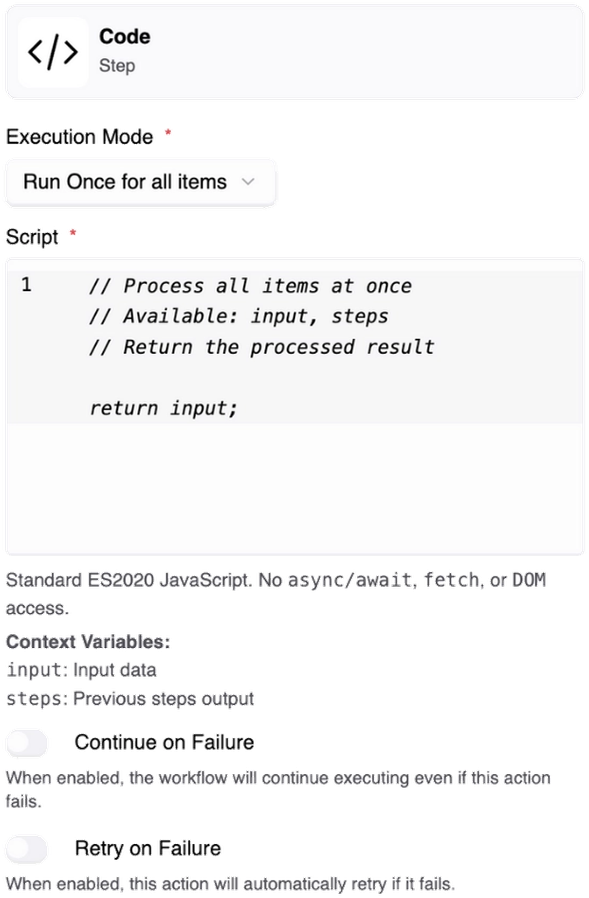
Run code once or in loop mode depending on your needs.
Your code runs once and produces a result. Ideal for simple data transformations and calculations.
const items = steps.step_4.full_response ?? [];

if (items.length === 0) {
  return { total: 0, average: 0, count: 0 };
}

const total = items.reduce((sum, o) => sum + o.amount, 0);
const average = total / items.length;

return { total, average, count: items.length };Runs your code for each element in an array. Ideal for batch data processing.
const items = steps.step_4.full_response ?? [];

if (items.length === 0) {
  return [];
}

return items.map(item => ({
  name: item.name.toUpperCase(),
  priceWithTax: item.price * 1.18,
  date: new Date().toISOString()
}));Here are some examples of what you can do with Code Executor.
Filter incoming data based on conditions.
const activeUsers =
  input.users.filter(
    u => u.status === "active"
  );
return { result: activeUsers };Transform data structures to fit your needs.
return input.items.map(item => ({
  name: item.name.toUpperCase(),
  priceWithTax: item.price * 1.18,
  date: new Date().toISOString()
}));Perform complex calculations in a single step.
const total = input.orders
  .reduce((sum, o) => sum + o.amount, 0);
const average =
  total / input.orders.length;
return { total, average };Isolated execution in a sandboxed environment
File system access is blocked
Network access and system commands are restricted
Time and memory limits are enforced for each execution
Build custom business logic beyond ready-made integrations.
Write custom code where ready-made integrations fall short.
Transform data formats without relying on external APIs.
Solve conditions and calculations in a single step.
Run code directly inside your workflow without setting up a development environment.
Join thousands of businesses that trust puq.ai to streamline their operations and boost productivity.
Get Started